


Page 59 - Photoshop User January 2017
P. 59
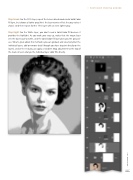
Step Seven: For the 50% layer, repeat the Screen blend mode and a Solid Color fill layer, but choose a lighter gray (hint: the layer names reflect the gray values I chose). And then repeat for the 75% layer with an even lighter gray.
Step Eight: For the White layer, you don’t need a Solid Color fill because it provides the highlight. As you work your way up, notice that the image layer sets the base back to white, and the Solid Color fill layer gives you the gray val- ues. What’s great about this method is you can go back and selectively blur the individual layers, add or remove detail (though you have to paint directly on the layers), and at the end you can apply a Gradient Map adjustment to the top of the stack, or even change the individual layer color fills directly.
› › PHOTOSHOP PROVING GROUND
059
› › kelbyone.com


