


Page 61 - Photoshop User January 2017
P. 61
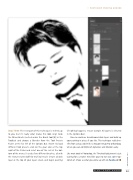
Step Three: The next part of this technique is entirely up to you, but it’s really what makes this look sing! Grab the Mixer Brush (nested under the Brush tool [B] in the Toolbar) and choose a Blender from the Tool Presets Picker at the far left of the Options Bar. (Note: To load different tool presets, click on the gear icon at the top right of the Picker and select one of the sets at the bot- tom of the menu.) I used a few different brushes, all with the textures turned off for my final result. Create a blank layer at the top of your layers stack, and begin painting
(if nothing happens, ensure Sample All Layers is selected in the Options Bar).
You can continue to add more blank layers and build up your painting in pieces if you like. This technique really ben- efits from using a tablet like a Wacom Intuos Pro or Bamboo, where you can control brush dynamics and rotation easily.
Like most tools in Photoshop, the Threshold adjustment is just waiting for a creative mind like yours to turn out some top- notch art. Show us what you come up with on Facebook! ■
› › PHOTOSHOP PROVING GROUND
CLICK TO RATE
061
› › kelbyone.com


