


Page 40 - Photoshop User January 2017
P. 40
HOW TO ››
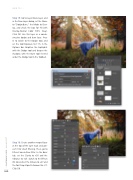
Step 15: Go to Layer>New Layer and in the New Layer dialog, set the Name to “Dodge-Burn,” the Mode to Over- lay, and check the box for Fill with Overlay-Neutral Color (50% Gray). Click OK. Use this layer as a nonde- structive dodge and burn layer. Press O to switch to the Dodge tool, and set the tool Exposure to 11% in the Options Bar. Brighten the highlights with the Dodge tool and deepen the shadows with the Burn tool (nested under the Dodge tool in the Toolbar).
040
Step 16: Create another merged layer at the top of the layer stack and con- vert it for smart filtering. Then, go to Filter>Camera Raw Filter. In the Basic tab, set the Clarity to +30 and the Vibrance to +25. Switch to the Effects (fx) tab and set the Dehaze to +27 and the Post Crop Vignette Amount to –27. Click OK.
› › photoshop user › january 2017


