


Page 41 - Photoshop User January 2017
P. 41
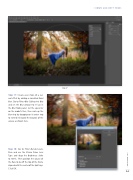
Step 17
› › DOWN AND DIRTY TRICKS
Step 17: Create even more of a sur- real effect by adding a simulated focal blur. Go to Filter>Blur Gallery>Iris Blur and set the Blur amount to 15 px in the Blur Tools panel. Set the epicenter on the model’s face, then scale up the blur ring by dragging on its outer ring to extend it beyond the bounds of the canvas as shown here.
Step 18: Go to Filter>Render>Lens Flare and use the 35mm Prime Lens Type and drag the Brightness slider to 100%. Then position the source of the flare to be off the top of the frame aligned with the center of the light rays. Click OK.
041
› › kelbyone.com


