


Page 33 - Photoshop User January 2017
P. 33
› › DOWN AND DIRTY TRICKS
Step 23
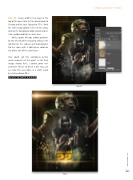
Step 23: Create another new layer at the top of the layer stack. Set the blend mode to Overlay and the layer Opacity to 75%. With the same radial gradient we’ve been using, click on the Foreground color swatch and set it to a yellow color like we have here.
Add a couple of large yellow gradients on the left side of the image to enhance the lighting on the subject and background. Do the same with a light-green color on the other side of the same layer.
You could call this composite pretty much complete at this point. In the final image shown here, I added some text and flare effects to finish it off. You can see how this was done in a short video by clicking here. ■
CLICK TO RATE
Final
033
› › kelbyone.com


