


Page 36 - Lightroom Magazine Issue 26
P. 36
› › lightroom magazine › ›
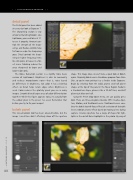
detail panel
The Detail panel has been added since our last look at Exposure 7. The Sharpening section is very similar to that of Lightroom. Like Lightroom, you need to be at 1:1 to see it properly. Amount con- trols the strength of the sharp- ening, and Radius controls how far from an edge the sharpening goes. Detail controls the sharp- ening in higher frequency items like skin pores or leaves in a for- est scene. Masking reduces the areas sharpened to larger and larger edges only.
The Noise Reduction section is a slightly more basic version of Lightroom’s. Brightness is akin to Luminosity and reduces monochrome noise—that is, noise based on differences in brightness, not color. It has a blurring effect, so Detail helps retain edges when Brightness is used. Color reduces the splotchy pixels you see in noisy images. Smooth blends larger areas of color differentiation together. While this figure appears noisy, it’s actually from the added grain in the preset I’ve used. Remember that before you try to fix your images!
bokeh panel
This lens-emulation tool has been covered before, but the image I used then didn’t effectively show off the aperture
shape. This image does, so we’ll take a quick look at Bokeh again. Originally, Bokeh was a standalone program from Alien Skin, so you’re now getting it as a freebie inside Exposure. Begin by selecting from the radial, planer, and half planer shapes at the top of the panel in the Focus Region. Radial is a standard lens shape, planer is like a tilt-shift lens, and half planer just blurs one half.
Using the Preset drop-down menu, we can quickly get a look. There are three categories (besides Off): Creative Aper- ture, Motion, and Traditional Lenses. Traditional Lenses emu- lates the bokeh (out-of-focus effect) of a selection of desirable lenses. Motion creates effects based on moving a lens during capture. Creative Aperture has a range of shapes for high- lights in the out-of-focus highlights in the photo. By way of
036
› › lightroom magazine › issue 26


