


Page 13 - Lightroom Magazine Issue 26
P. 13
› › lightroom magazine › ›
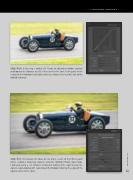
step four: In this step, I added +35 Clarity to add more midtone contrast and boosted the Vibrance to +50. I then went to the Tone Curve panel where I adjusted the Highlights and Lights sliders (as shown here) to add a kick to the highlight contrast.
step five: To maintain the focus on the driver, I went to the Effects panel
where I added a darkening vignette using the Highlight Priority Style mode.
I darkened using a –27 Amount setting and feathered the edge to keep the
vignette edges looking soft. I also moved the Midpoint to bring the edges of the
vignette closer to the driver. 013
› › kelbyone.com


