


Page 73 - Photoshop User January 2017
P. 73
LIGHTROOM MOBILE
There’s a handy Gesture Shortcuts guide under the Lr logo in the same place as the Sync Only Over WiFi option I mentioned earlier. There are three gestures I use all the time: toggle information; show before/after; and swipe up/down to rate and apply flags.
A two-finger tap toggles information displays. In
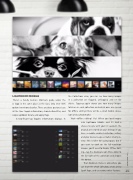
the Collections view, you can see how many images in a collection are flagged, unflagged, and set for delete. Tapping again shows you how many images total are in each collection and which ones are synced for offline editing (there will be a small mobile device icon and a checkmark).
Wait—offline editing? Yes! When you load images into Lightroom Mobile and it’s had a chance to sync with your CC account, the original gets stored on your desktop (if you have a mobile-enabled collection active), and your device keeps a smaller smart pre- view. This is killer for saving space, but if you want to work on the full-resolution images, you’ll need to Enable Offline Edit- ing—tap the disclosure icon (three dots) to the far right of the collection and choose
the option.
That disclosure menu is also where you
can share the whole collection, create a new Spark Page, and use various other features.
073
› › kelbyone.com


