


Page 53 - Photoshop User January 2017
P. 53
› › DYNAMIC RANGE
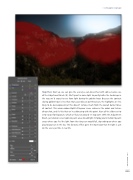
Step Five: Next up, we can give the scenery a sun-kissed feel with some creative use of the Adjustment Brush (K). We’ll paint in some light to gently bathe the landscape in the way we’d expect to see from light during the golden hour. Because the contrast during golden hour is less than that caused by an overhead sun, the highlights are less likely to be overexposed, but this doesn’t remove much from the overall darker tones of contrast. This warm-colored light hitting our scene enhances the colors and texture of our shot, and it’s this that we’re addressing with this point. Have all the sliders set to zero except for Exposure, which we’ll put at around +1 stop over. With the Adjustment Brush, just click on select spots or paint areas to add light. Employ your intuition to paint areas where you feel the light from the rising sun would fall, depending on where you placed your sun in the sky. This fantastic effect gives the impression that the light is cast on the scene just like in real life.
053
› › kelbyone.com


