


Page 50 - Photoshop User January 2017
P. 50
HOW TO ››
Dynamic Range
creating a golden-hour look in adobe camera raw
DAVE WILLIAMS
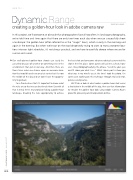
In this project, we’ll overcome an obstacle that photographers face all too often. In landscape photography, we’re told time and time again that there are only two times each day when we can successfully shoot a landscape: the golden hour (often referred to as the “magic” hour), which is early in the morning and again in the evening. But when we’re out on the road desperately trying to cram so many awesome loca- tions into our tight schedules, it’s not always practical, and we have to carefully choose where we are for sunrise and sunset.
Our well-planned golden-hour shoots can easily be cancelled because of weather or something else in the environment that gets in our way. And then there are those times when we chance upon an awesome loca- tion that would have been great at sunrise but it’s now the middle of the day and we don’t have the opportu- nity to go back.
I’m a firm believer that it’s important to know what the rules are so that we can best break them! So with all that in mind, here’s my tutorial on faking a golden-hour landscape, breaking the rules appropriately to achieve
the best shot and overcome whatever obstacle prevented the shot in the first place. Some purists will call me a cheat; how- ever, I live photographically by the phrase, “Lend me your eyes and I’ll show you what I see.” What I do in post is show you what was in my mind’s eye at the time I took the photo. I’ve spent years working on this technique through trial and error, patience and practice.
We’ll take a look at what makes a golden hour shot versus a shot taken in the middle of the day, then use that information to emulate the golden hour look using Adobe Camera Raw’s powerful processing and manipulation abilities.
050
› › photoshop user › january 2017


