


Page 48 - Photoshop User January 2017
P. 48
HOW TO ››
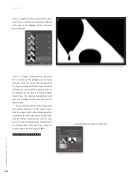
Step 10: Load the white areas of the alpha channel as a selection by clicking the dotted circle icon at the bottom of the Channels panel (circled).
Step 11: Choose Select>Inverse to invert the selection so the balloons are selected instead. Click the Layers tab to switch to the Layers panel, and add a layer mask by clicking the circle-within-a-square icon at the bottom of the panel (circled). Photo- shop hides the original background and you see through to the new sky on the layer below.
If you need to edit the layer mask, you can always activate it in the Layers panel and then paint with either black or white according to what you want to do (con- ceal or reveal, respectively). Just be sure to set the Brush Mode back to Normal in the Options Bar. Until next time, may the creative force be with you all! ■
CLICK TO RATE
Click-and-hold on the image for a before view
048
› › photoshop user › january 2017


