


Page 47 - Photoshop User January 2017
P. 47
› › BEGINNERS' WORKSHOP
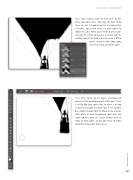
Step Eight: Repeat Steps Six and Seven on the other noticeable wires. You may not have to do them all, but it’s good practice at making thin selections. For curved wires, set more points to follow the curve. When you’re finished, press Com- mand-D (PC: Ctrl-D) to deselect, and then click the visibility icon of the RGB channel to turn it off so
you’re seeing the Blue copy alpha channel as black and white again.
Step Nine: Touch up the upper- and lower-left corners of the background with white paint. Press X to flip-flop your color chips so white is on top and press B to grab the Brush tool. In the Options Bar, choose Overlay from the Mode menu (circled). With white as your Foreground color chip, this mode lightens gray, yet leaves existing areas of white or black alone, so you don’t have to worry about brushing across those areas.
047
› › kelbyone.com


