


Page 44 - Photoshop User January 2017
P. 44
HOW TO ››
Beginners' Workshop how to create a selection using channels
LESA SNIDER
Sometimes the easiest way to make a tricky selection is to let the image do the work for you. If you have good contrast between what you want to select and its background, try using the photo’s individual color channels to create a precise selection that you can hide with a mask.
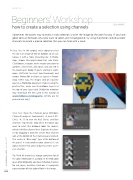
Step One: In this tutorial, we’re going to select the sky in an image of hot-air balloons so we can replace it with a more interesting sky. In Photo- shop, choose File>Scripts>Load Files into Stack. Click Browse, navigate to the images you want to combine, select them, click Open, and click OK in the Load Layers dialog. If you’re starting in Light- room, Shift-click to select two thumbnails and choose Photo>Edit In>Open as Layers in Photo- shop. Either way, the images land on separate layers in a Photoshop document. If you’re using the practice files, make sure the balloons layer is at the top of your layer stack. [KelbyOne members may download the files used in this tutorial at www.kelbyone.com/magazine. All files are for personal use only.]
Step Two: Open the Channels panel (Window> Channels) and press Command-3, -4, and -5 (PC: Ctrl-3, -4, -5) to view the Red, Green, and Blue channels, respectively. Stop when the object you want to select (the balloons) looks the darkest, which is the Blue channel here. Duplicate the chan- nel by dragging it onto the Create New Channel icon at the bottom of the Channels panel (circled). This creates a “Blue copy” layer at the bottom of the panel. It’s not another color channel; it’s an alpha channel that you’ll adjust to create a pre- cise selection.
Tip: Think of channels as storage containers for all the color information in a photo. In the RGB color space of photography, you have individual channels for red, green, and blue. Each one is a grayscale representation of that color of light in the image.
044
› › photoshop user › january 2017
©ADOBE STOCK/NIK_MERKULOV
LESA SNIDER


