


Page 19 - Lightroom Magazine Issue 28
P. 19
› › lightroom magazine › ›
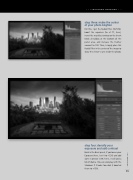
step three: make the center of your photo brighter
For this, I get the Radial Filter (Shift-M), boost the exposure (to +1.77, here), invert the mask by turning on the Invert Mask checkbox at the bottom of the panel area, and increase the Feather amount to 100. Then, I simply place this Radial Filter in the center of the image to draw the viewer’s eyes inside the photo.
step four: densify your exposure and add contrast
Back in the Basic panel, if you lower your Exposure (here, I set it to –0.30) and add some Contrast (+39, here), it will add a lot of drama. You can also play with the Shadows if it looks too dark (I boosted them to +100).
019
› › kelbyone.com


