


Page 13 - Lightroom Magazine Issue 28
P. 13
› › lightroom magazine › ›
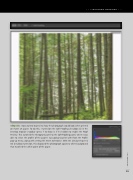
step six: I now wanted to preview how the photograph would look when printed on matte art paper. To do this, I turned on the Soft Proofing checkbox (S) in the Develop module’s toolbar (press T to show it, if it’s hidden) to enable the Proof Preview. This switched the Histogram panel to the Soft Proofing panel, where I was able to select the profile of the paper I was going to print with from the Profile pop-up menu, along with setting the Intent to Relative. With the Simulate Paper & Ink checkbox turned on, this displayed the photograph against a white background that matched the white point of the paper.
013
› › kelbyone.com


