


Page 11 - Lightroom Magazine Issue 28
P. 11
› › lightroom magazine › ›
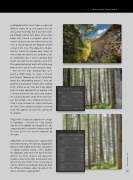
I photographed the trestle from a number of different angles to try and capture the size and scale of the bridge. But it was while walk- ing through a forest path down to the valley below that I found a viewpoint where the trestle’s structure was just visible between the trees. It helped too that the footpath created a break in the trees. This allowed me to posi- tion the camera far enough back, about 20 meters from the closest trees, to obtain a flat- ter perspective view. I used a standard focal length lens with the lens aperture set to f/14. This provided plenty of depth of field to keep both the trees and the trestle structure sharp.
Here are the steps showing how I pre- pared a RAW image to create a fine-art print output, followed by a brief explanation about the soft-proofing process. I find soft proofing is particularly helpful when making prints. Doing so can help you make appro- priate Develop adjustments by working with a simulated preview that takes into account the reduced dynamic range of the print out- put. For example, when making matte prints, I find it helps to boost the clarity and tweak the Tone Curve contrast to achieve a printed result that appears to match the contrast of the original.
step one: I began by cropping the image in Lightroom. I selected the Crop Overlay tool (R) in the toolbox and dragged the side cropping handles inward to remove some of the trees on the left and the footpath on the right.
step two: In the Basic panel, I adjusted the
Tone sliders to reduce the contrast, dragged the
Exposure slider slightly to the right, and applied
a negative Contrast setting. I then dragged
the Highlights slider to the left to reveal more
detail in the trestle structure and moved the
Shadows slider to the right to bring out more
detail in the tree trunks. Then, I pressed-and-
held the Shift key and double-clicked on both
the Whites and Blacks sliders to auto-set the
whites and blacks clipping points. 011
› › kelbyone.com


