


Page 25 - Lightroom Magazine Issue 27
P. 25
› › lightroom magazine › ›
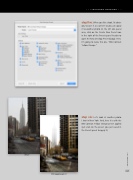
step five: When you like a look, I’d advise you to save it as a preset so you can apply it to another photo (in the left side panel area, click on the Create New Preset icon in the right of the Presets panel header to open the New Develop Preset dialog). Here, I’m going to name this one “BW Contrast Yellow Orange.”
step six: Let’s look at another photo I shot in New York. And, here it is with the BW Contrast Yellow Orange preset applied (just click on the preset you just saved in the Presets panel to apply it).
Before
After applying preset
025
› › kelbyone.com


