


Page 24 - Lightroom Magazine Issue 27
P. 24
› › lightroom magazine › ›
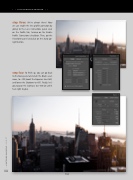
step three: We’re almost there! Now we can enable the lens profile correction by going to the Lens Corrections panel and, on the Profile tab, turning on the Enable Profile Corrections checkbox. Then, go the Transform panel and click on the Auto Up- right button.
step four: To finish up, you can go back to the Basic panel and crush the Blacks even more, to –100; boost the Exposure to +0.60; and lower the Shadows to +85. Finally, let’s go crazy on the Contrast, to +100 (or until it feels right to you).
024
Final
› › lightroom magazine › issue 27


