


Page 26 - Lightroom Magazine Issue 27
P. 26
› › lightroom magazine › ›
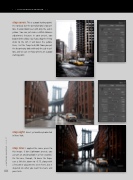
step seven: This is a good starting point. It’s not bad, but the overall photo is too yel- low. It would look nicer with only the cab in yellow. You can just make a White Balance adjustment, because in your preset, you boosted the yellow. So, if you drag the Temp slider to the left, it will lower the yellow. Here, I set the Temp to 4,299. Now you get the decontrasty look with only the cab in yel- low, and we can see how presets are a good starting point.
step eight: Here’s yet another photo shot in New York.
step nine: I applied the same preset to this image. (I love Lightroom presets; you can get an amazing look in a few seconds.) On this one, though, I’d lower the Expo- sure a little bit, down to –0.75, along with a few other adjustments (seen here), but it depends on what you want to create and
026 your taste.
› › lightroom magazine › issue 27


