


Page 19 - Lightroom Magazine Issue 27
P. 19
› › lightroom magazine › ›
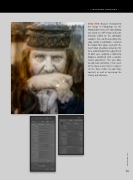
step nine: Because I had opened the image in Photoshop via the Photo>Edit In menu, the edited photo was saved as a TIFF image and auto- matically added to my Lightroom catalog. I then continued editing this copy version in Lightroom. I selected the Radial Filter again, and with the Invert Mask checkbox turned on this time, added Radial Filter adjustments to both eyes, applying a lightening Exposure combined with a positive Clarity adjustment. This was done to add more definition. I then went to the Basic panel where I adjust- ed the Tone sliders to add more contrast, as well as increasing the Clarity and Vibrance.
019
› › kelbyone.com


