


Page 17 - Lightroom Magazine Issue 26
P. 17
› › lightroom magazine › ›
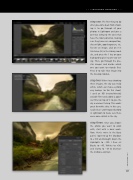
step one: The first thing to do after you come back from shoot- ing is to go through all your photos in Lightroom and give a one-star rating to the ones that have the most potential, making sure they have nice composition, decent light, good exposure, etc. To rate an image, click on it in Grid view (G) in the Library mod- ule, and press the 1 key on your keyboard to give it a one-star rat- ing. Then, go through the one- star images and decide which one you want to retouch first. Press D to take that image into the Develop module.
step two: When I was shooting these images, the sky was really white, which can make a photo very boring. So for this shoot, I used an ND (neutral-density) variable filter and added a polar- izer filter on top of it to give the sky a warmer feeling. This works great for white skies. In this case, I picked an underexposed photo in Lightroom to make sure there were some details in the sky.
step three: Once you choose the photo you want to work with, start with a basic work- flow. Here’s mine: In the Basic panel, I opened up the Shadows to +100 and brought down the Highlights to –100. I then set Blacks to –45, Whites to +36, and Clarity to –18 to decrease the midtone contrast.
017
› › kelbyone.com


