


Page 65 - Photoshop User January 2017
P. 65
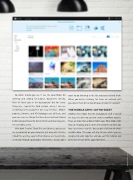
So which should you use? I use the local folder for deleting and adding full project documents directly, then let them sync in the background. But for every- thing else, I go to the Web version, where I can see everything in my account in one easy interface. Mobile projects, Libraries, and XD Prototypes are all there, and you can even see things that have been archived (stored before you permanently delete them) and shared assets. It’s incredibly useful.
With both Creative Cloud Files and Libraries, your assets are saved locally on your computer, but only with Creative Cloud Files are they easy to find. Libraries are meant to be used only through applications themselves, so you don’t
want to go tinkering in the file structures to find them. When you delete a Library, the items are archived until you delete them or run out of space in your CC account.
THE MOBILE APPS—GITTIN’ BIZZY
Alrighty, then! Now that the background stuff is out of the way, let’s dive into a pair of creative workflow projects. There are more than a dozen mobile apps from Adobe right now, so I’m going to pick some of my favorites to show you how I use them in real life. You can get a full view of what’s available here. This page will also tell you which apps are designed to work together, and you can find tutorials and overviews of each of the apps from there.
065
› › kelbyone.com


