


Page 64 - Photoshop User January 2017
P. 64
THE CREATIVE CLOUD APP—KEEPING YOUR STUFF TOGETHER
Since one of the key capabilities in the current suite is inte- gration, I want to talk a bit about how files and assets are shared across apps and devices through your Creative Cloud account. While many apps can share directly or make round trips (such as Lightroom Mobile making use of Photoshop Fix’s ability to heal and liquify), if you want to have true freedom of mobility, you’ll need to understand both CC Libraries and the Creative Cloud Files folder.
Libraries are the most visible aspect of sharing, especially from desktop apps. They’re primarily meant to hold proj- ect assets, such as styles, colors, and graphic elements. You have a panel (Window>Libraries) directly in desktop apps such as Photoshop and Illustrator that lets you see and manage multiple libraries very easily. These same libraries are available to many of Adobe’s mobile apps. Here’s a link to Adobe’s site that helps explain how CC Libraries work.
Creative Cloud Files is a different beast, and it’s not always obvious from the desktop. The Creative Cloud Files folder is where actual project documents are stored when moving from mobile to desktop. For example, when you create a mockup in Adobe Comp CC and send the file to Photoshop, it’s first sent through your Creative Cloud account then written to a folder on your computer. The Creative Cloud app keeps track of these assets, helping you stay organized and synced.
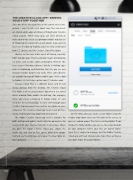
The Adobe Creative Cloud app itself is available for both desktop and mobile, and is really the go-to place for seeing all of your creative materials in one place. When you open the Adobe Creative Cloud app, choose the Assets tab, and click on Files, you’re offered the oppor- tunity to see the Web app, or to open the local folder on your computer.
On the Web, you can create a new folder using the Actions drop-down menu on the right of the screen, or you can upload project files to an existing folder. If you choose the Folder option, you can see the actual location on your computer where your files are stored. Some- times this is simpler to manage, and the Adobe Creative Cloud app will track changes you make there as long as you don’t move the parent folder.
064
› › photoshop user › january 2017


