


Page 43 - Lightroom Magazine Issue 28
P. 43
› › lightroom magazine › ›
shape tools
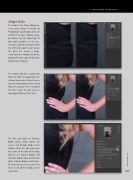
The tools in the Shape Tools pan- el are quite similar in function to Photoshop’s Liquify tools; some are restricted to your markup areas, but others, like the Warp tool, let you work anywhere. In this case, I used this tool (the third one from the left) to fix under the arm where the dress has caused a bulge. I also fixed the bottom left of the photo where the edge of the back- ground was showing.
The Repair tool (the second one from the right; the Band-Aid) can reshape areas where there’s been a tear due to overlap or issues arising from the markup. Here, I reshaped the dress under the arm where it was jagged from such an issue.
The first two tools are Reshape
Body Curves, which moves the
curves, and Reshape Body Curves
Locally, which lets you move part
of a curve. To the right of the Warp
tool are the Expand Region and
Contract Region tools, and the last
tool is Correct Bulges and Pinches.
To really tidy up an area, you need
to use a mix of these tools, but it’s
easy to do. 043
› › kelbyone.com


