


Page 54 - Lightroom Magazine Issue 27
P. 54
› › lightroom magazine › ›
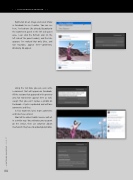
Right-click on an image and select Show in Facebook to see it online. You can see here, I’ve had one Like already. By going to the Comments panel in the left side panel area, I can click the Refresh icon (in the left side of the panel header), and the Like appears. I’ve noticed that only Likes, and not reactions, appear here—comments, obviously, do appear.
054
Using the text box, you can even write a comment that will appear on Facebook. All the sections that appeared in the preview area for Hard Drive appear here as well, except that you can’t replace a photo on Facebook—it gets reuploaded and will lose comments and likes.
A few moments later, more comments and Likes have arrived.
Most of the other Publish Services will act in a similar way. You authorize your account on the service, then use whatever album mechanism they have to upload your photos.
› › lightroom magazine › issue 27


