


Page 33 - Lightroom Magazine Issue 26
P. 33
› › lightroom magazine › ›
The program is a staple of superstar photographers like Sue Bryce and Lara Jade, who also provide custom textures for the program. I’m quite partial to the plug-in myself and find it quite a versa- tile image processor for finishing images.
install and use
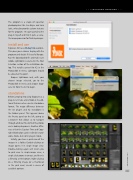
Exposure X2 has a 30-day trial available. This gives you a chance to play with the program and decide if it’s useful for you. Run the downloaded file and make sure Adobe Lightroom is selected in the Host Selection section of the installation dia- log. This installs a preset for X2 in the Photo>Edit In menu. Lightroom should be closed at this point.
Reopen Lightroom and, with your chosen image selected, go to the Photo>Edit In menu and choose Expo- sure X2 from the list to begin.
standalone
Before jumping into using Exposure as a plug-in, let’s take a brief look at its addi- tional features when used in standalone format. The major difference between the X2 plug-in and X2 standalone is the Folders panel. This appears above the Presets panel on the left, giving us a browser that allows us to navigate through all of our files to find the photos we’re looking to process. Another differ- ence is that the Capture Time and Copy- right information can be edited in stand- alone mode, but not in plug-in mode.
Initially, you have a grid view of the images in a folder. Double-clicking an image opens it in single image view. Double-clicking again will return you to grid view. In single-image view, a single click zooms in or out, and there’s a filmstrip at the bottom. Right-clicking on a filmstrip image (or a thumbnail in the grid view) reveals a menu of available options.
033
› › kelbyone.com


