


Page 39 - Lightroom Magazine Issue 28
P. 39
› › lightroom magazine › ›
getting started
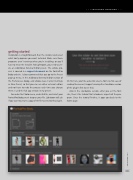
Installation is straightforward. Run the installer and select what host programs you want included. Make sure those programs aren’t running when you’re installing, or you’ll have to rerun the installer. For Lightroom, you need to cre- ate an Additional External Editor preset. The whole pro- cess is covered in a support document on the PortraitPro Body website. I also recommend that you go to the Preset pop-up menu, in the Additional External Editor section of the Preferences dialog, and choose Save Current Settings as New Preset, so that you can use other external editors and not have to redo the process each time you change them. I used the full app version in my preset.
Go under the Photo menu, under Edit In, and select your PortraitPro Body preset to open your file. Lightroom will ask if you want to create a copy of the file to send to the plug-in.
On first run, you’ll be asked to select a font size for ease of reading the menus (I suggest running the standalone version of the plug-in first to see this).
Also in the standalone version, after you set the font size, there’s the tutorial that introduces aspects of the pro- gram. Once the tutorial finishes, it pops you back to the home page.
039
› › kelbyone.com


