


Page 49 - Lightroom Magazine Issue 27
P. 49
› › lightroom magazine › ›
publish vs. export
The typical route for getting images out of Lightroom is Export. This creates a hard copy of your image on your drive, which can be uploaded, emailed, shared via Dropbox etc. But, once it has left Lightroom, you have no record of anything that’s happened to your photo. Publish Services are different. They’re like Export on steroids (minus the rage). With a Publish Service, the files are uploaded as part of the operation and get removed from the drive after pub- lishing has finished. The published images remain inside a special folder inside Lightroom, so you can see what you’ve already published to the service. As a bonus, any interac- tion the public has with each image comes back into Light- room, so all comments, likes, favorites, etc., actually appear in Lightroom itself. You can even reply to comments inside Lightroom! How cool is that?
shipping services
Lightroom ships with a number of Publish Services:
Hard Drive: This allows you to track images you pub- lish to your hard drive. In this case, the images don’t get deleted, as the drive is the final destination. It’s useful for things like Dropbox tracking or even just using it to track a portfolio folder.
Adobe Stock: You need to set up a contributor account with Adobe to use this. This Publish Service allows you to manage images uploaded to Adobe Stock for sale.
Facebook: As one of the most popular image-sharing sites in the world, you can publish directly to Facebook Albums from within Lightroom.
Flickr: Another big photo-sharing site. Despite the rise of other sites, Flickr still offers great online sharing and stor- ing facilities.
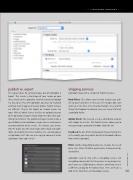
Lightroom used to ship with a SmugMug service, but SmugMug now handles this themselves. In my image here,
you’ll also see a Mylio plug-in, which is something I use in
a different catalog for the Mylio service. Here, we’ll take a
look at the Hard Drive and Facebook services. 049
› › kelbyone.com


